

Technical blog
Native SAP Build Apps Integration with Document AI
Created by Claude (Opus 4.5)

Jaroslav Pokorný
3. 11. 2025
AI
Modern business processes require agile development and intelligent automation. We will demonstrate the technical architecture and implementation details of a composite application, ExpenseSnap, which showcases the power of SAP Build Apps as an orchestration platform for intelligent services, specifically SAP Document AI and SAP Build Process Automation (BPA).
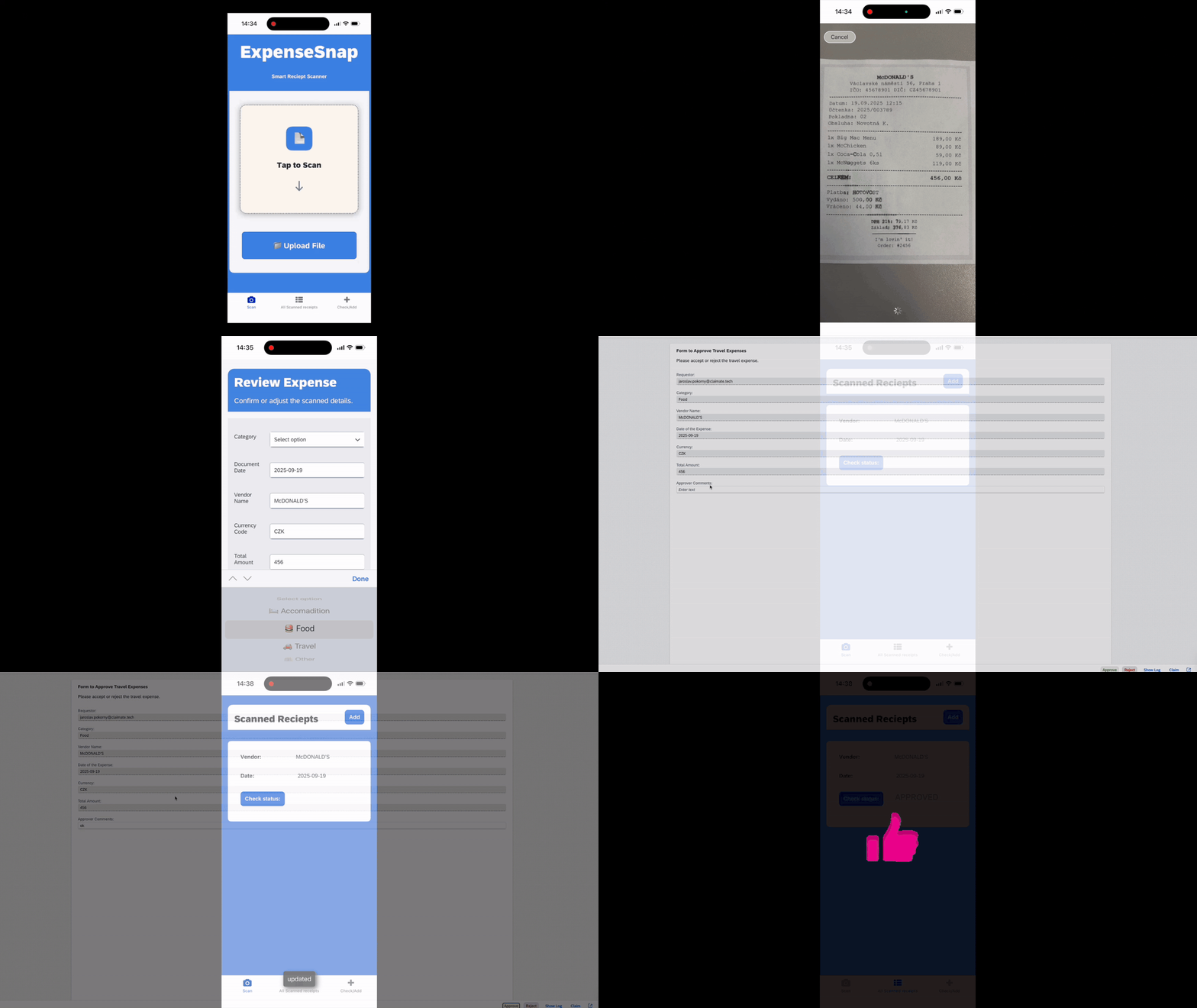
We are not just solving the traditional problem of manual expense processing as a UI challenge, but as a complex integration challenge: how to ensure reliable data extraction, user validation, and an auditable approval process with minimal "glue code."
Overall Architecture and Data Flow
The solution is built as a 100% cloud-native application on the SAP BTP and consists of three decoupled components:
Frontend & Orchestrator: SAP Build Apps (mobile client).
AI Extraction Service: SAP Document AI (formerly known as Document Information Extraction or DOX).
Backend & Workflow Engine: SAP Build Process Automation (BPA).
The data flow is driven exclusively by API calls, with SAP Build Apps acting as the primary REST API client and orchestrator for the end device.
Technical Deep-Dive: Key Components
1. SAP Build Apps as the Orchestration Layer
In this architecture, SAP Build Apps is not just a "drag-and-drop" UI tool. It serves as a fully-fledged low-code client capable of managing complex logic and direct API consumption.
State Management: The application locally manages the state of the entire process—from capturing the image, to waiting for the asynchronous response from DOX, to the final submission to the workflow.
Native REST API Calls: The key strength of Build Apps lies in its direct REST API integration. The application does not require any middleware (like SAP Cloud Integration) for this basic interaction, as it handles the HTTP requests and parses the JSON responses itself.
Client-Side Logic: Build Apps handles validation logic (e.g., checking if the totalAmount field is empty) beforesending the data to BPA, thereby reducing the load on the backend workflow.

2. SAP Document AI (formely DOX ) integration
This is the core of the intelligent part of the application. We utilize SAP Document AI, the service formerly known as Document Information Extraction (DOX). The integration relies on its underlying API (which, as of this writing, still often retains the original document_information_extraction_api name) and is key from the Build Apps perspective.
The process is inherently asynchronous:
POST Request (Job Submission):
The /document/jobs endpoint is called from Build Apps (method POST).
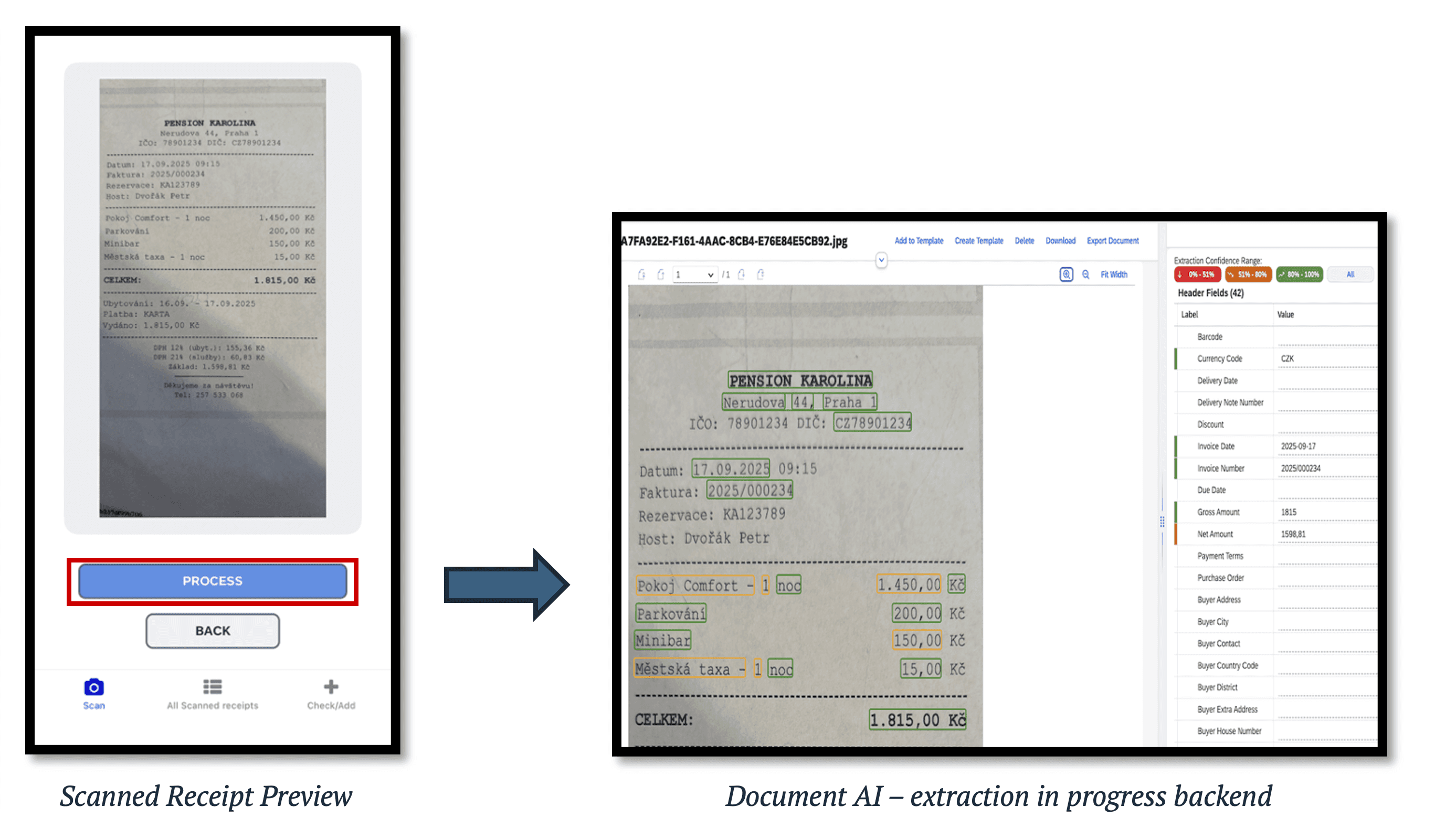
The body of the request is multipart/form-data containing the file itself (receipt image) and options (JSON defining which extraction model to use, e.g., pre-trained paymentReceipt or invoice).
The DOX service does not return the data immediately. Instead, it responds with a 201 (Created) status and returns a jobId and status: PENDING in the response body.
GET Request (Polling for Status):
SAP Build Apps must implement polling logic. It stores the returned jobId in a local app variable.
Then, at a defined interval (e.g., using the DELAY flow function), it calls the /document/jobs/{jobId} endpoint (method GET).
It repeats this query until the JSON response contains status: DONE.
Processing the Response:
Once the status is DONE, the response from the GET endpoint contains the complete extracted data in the extraction.headerFields and extraction.lineItems arrays.
Build Apps parses this JSON structure and maps the values (e.g., vendorName.value, totalAmount.value) directly to Data Variables, which are bound to the UI input fields.
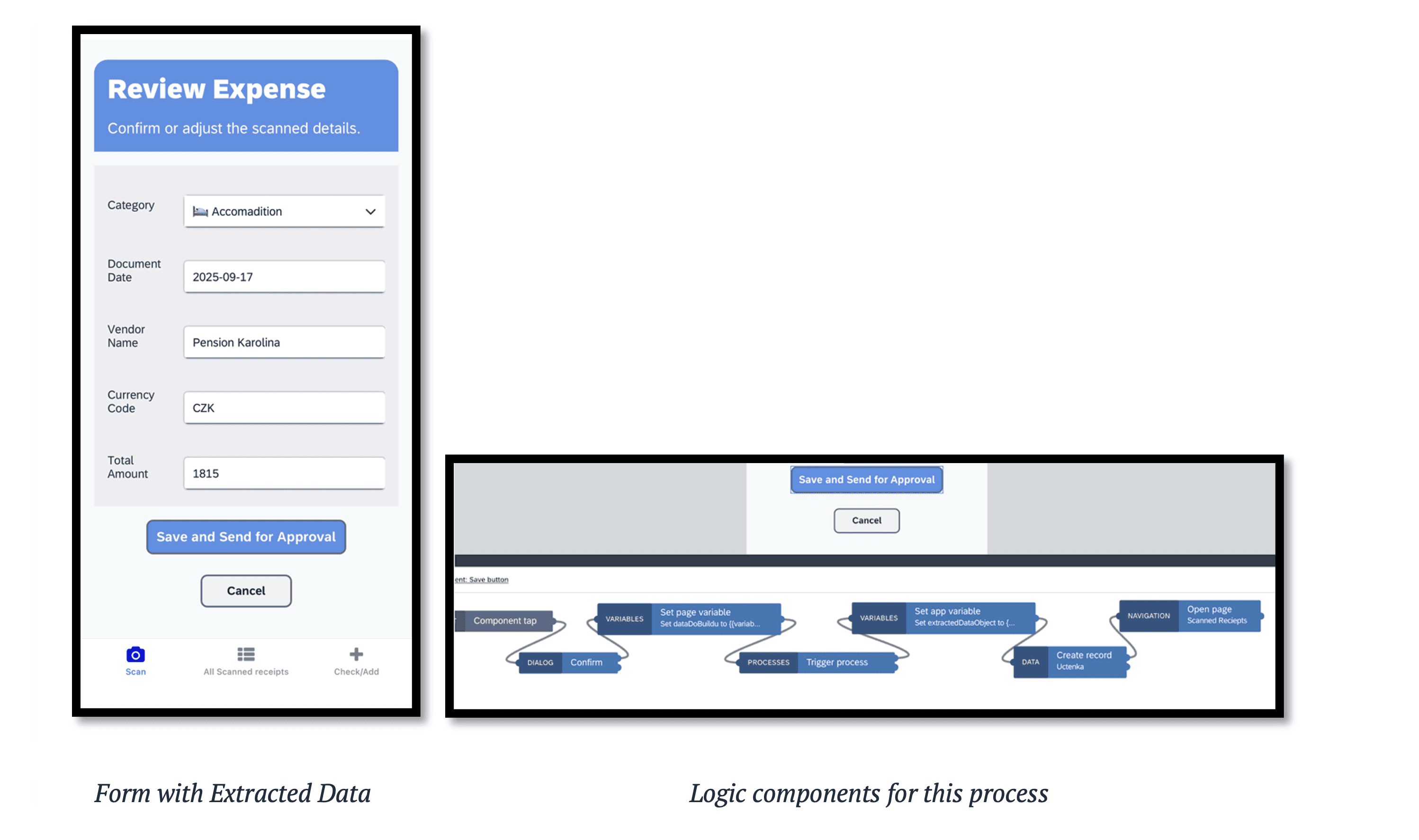
3. SAP Build Process Automation (BPA) as the Backend
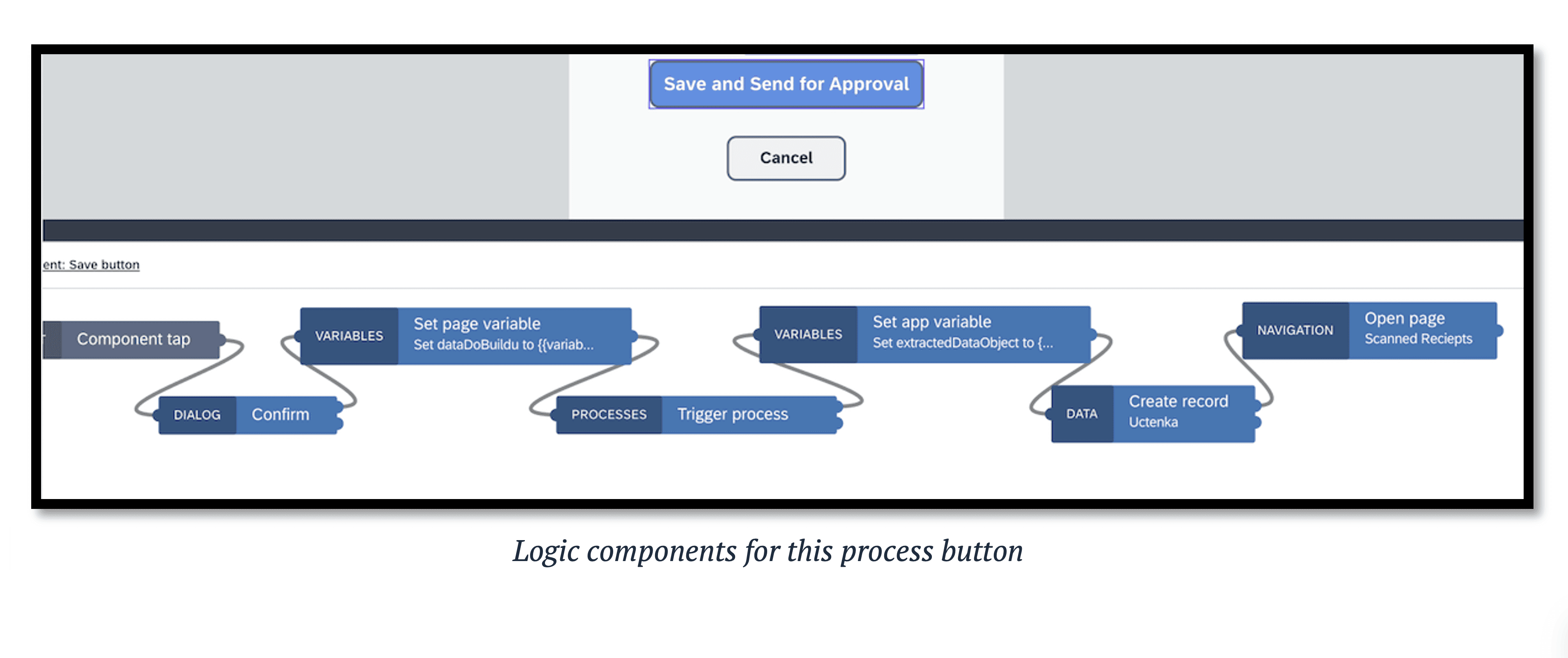
Once the user validates the data in Build Apps and presses "Save and Send for Approval," the process moves from data extraction to formal approval.
API Trigger: An API Trigger exposes the workflow in BPA. Build Apps makes one final POST call to this endpoint.
Payload: The body of this call is a clean JSON payload containing the validated data from the form (Requestor, Category, Vendor, Amount, etc.).
Decoupling: From this moment, responsibility for the process is handed off. BPA handles all business logic (who approves, what happens on rejection, escalations) and ensures a full audit trail. The manager sees the task in their "My Inbox."
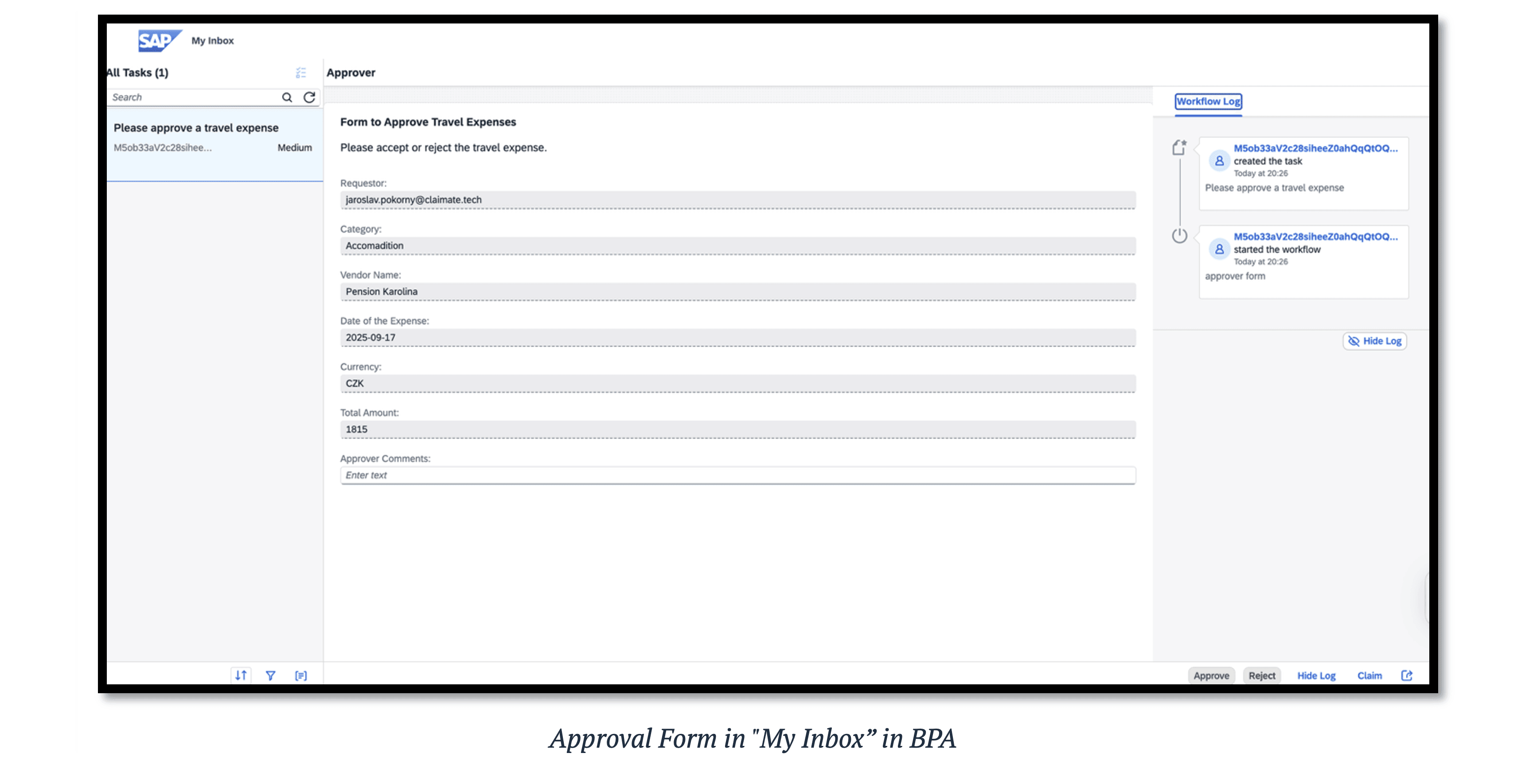

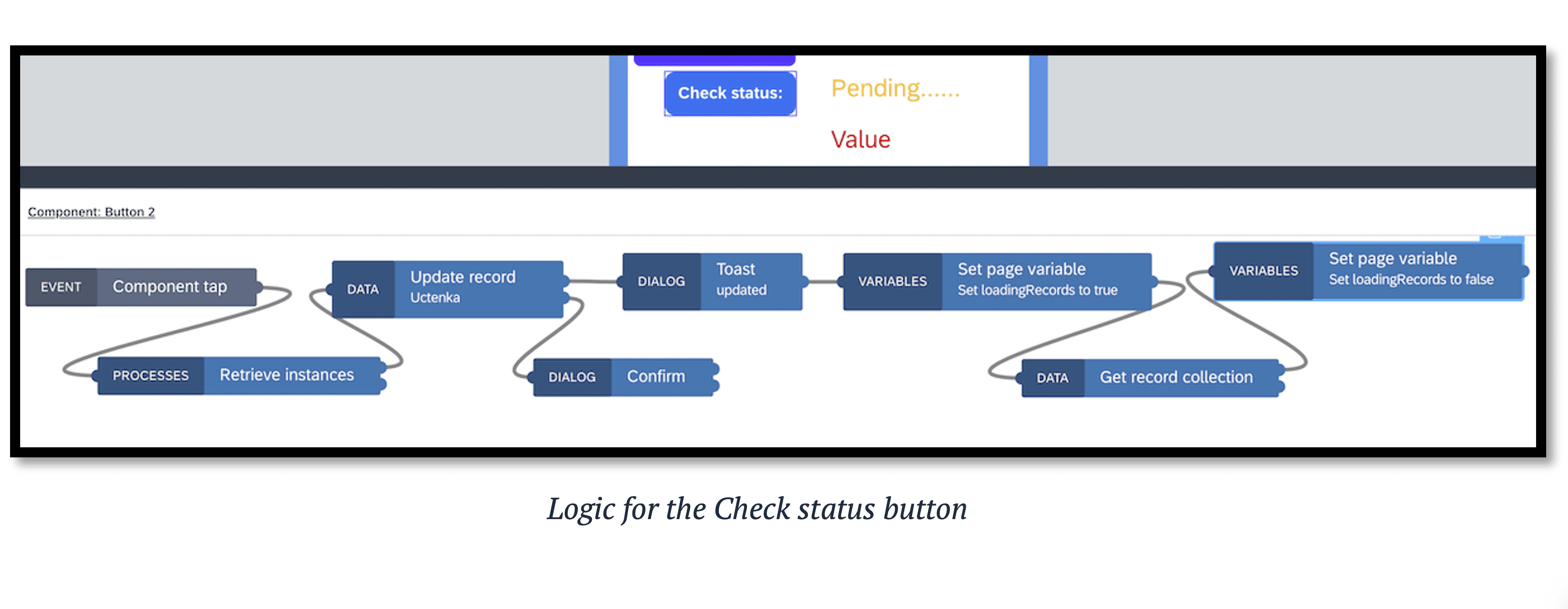
Status Monitoring: The "Check Status" function in the mobile app is realized by another API call that retrieves the current status of the running workflow instance from BPA.
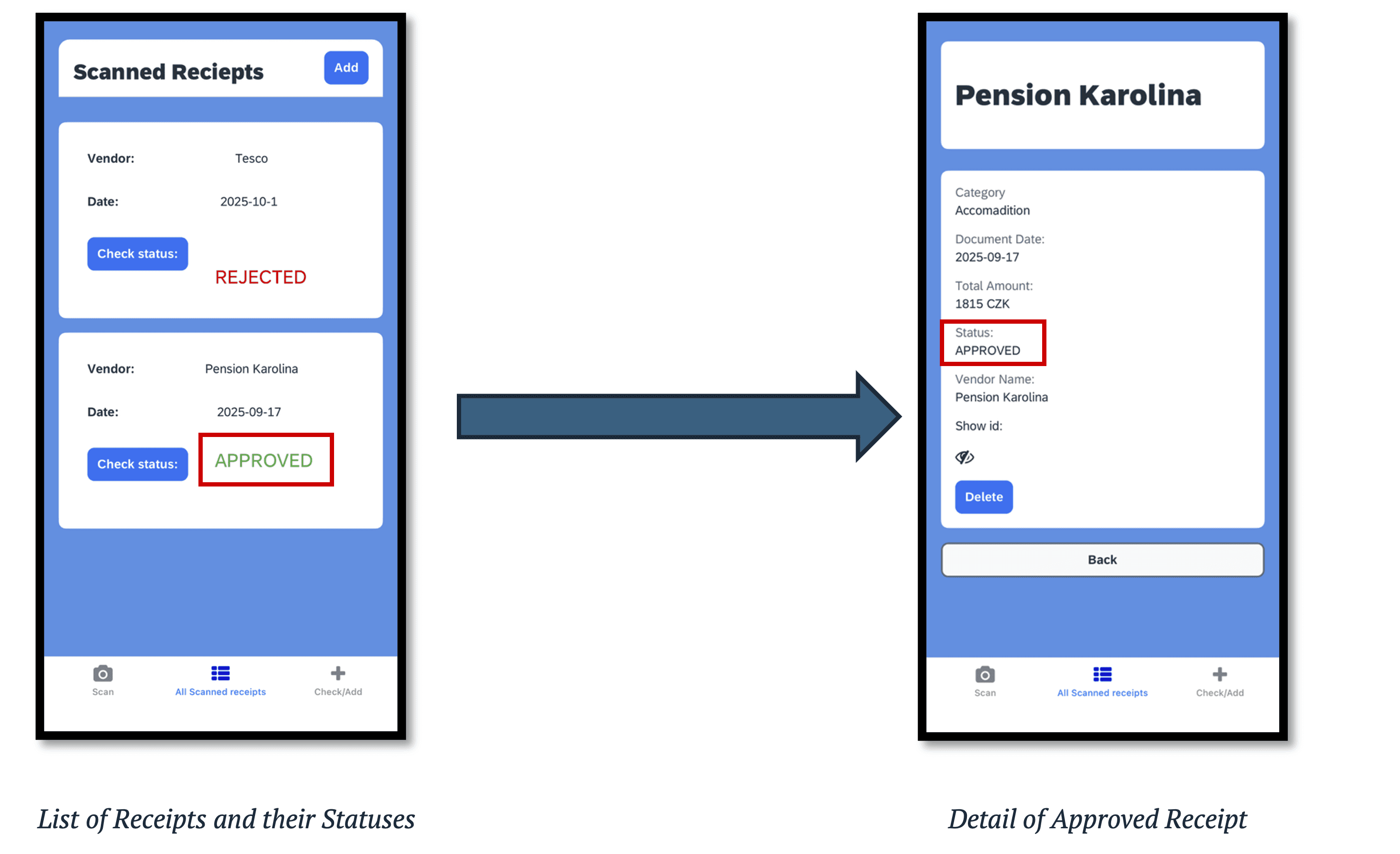
This monitoring even allows drilling down into the details for full transparency for the end-user.
Conclusion
The ExpenseSnap application is not just a receipt scanning tool. It is an architectural example of a composite AI application built on the SAP BTP. It demonstrates that SAP Build Apps extends beyond being just a UI tool, serving as a robust orchestrator capable of managing direct integration with asynchronous AI services (Document AI) while also connecting to a transactional backend (Build Process Automation).
This approach, using a low-code platform to manage API calls, enables extremely Rapid Application Development (RAD) for complex, intelligent, and process-driven mobile solutions.
Technical blog
Native SAP Build Apps Integration with Document AI
Created by Claude (Opus 4.5)
Jaroslav Pokorný
3. 11. 2025
AI
Modern business processes require agile development and intelligent automation. We will demonstrate the technical architecture and implementation details of a composite application, ExpenseSnap, which showcases the power of SAP Build Apps as an orchestration platform for intelligent services, specifically SAP Document AI and SAP Build Process Automation (BPA).
We are not just solving the traditional problem of manual expense processing as a UI challenge, but as a complex integration challenge: how to ensure reliable data extraction, user validation, and an auditable approval process with minimal "glue code."
Overall Architecture and Data Flow
The solution is built as a 100% cloud-native application on the SAP BTP and consists of three decoupled components:
Frontend & Orchestrator: SAP Build Apps (mobile client).
AI Extraction Service: SAP Document AI (formerly known as Document Information Extraction or DOX).
Backend & Workflow Engine: SAP Build Process Automation (BPA).
The data flow is driven exclusively by API calls, with SAP Build Apps acting as the primary REST API client and orchestrator for the end device.
Technical Deep-Dive: Key Components
1. SAP Build Apps as the Orchestration Layer
In this architecture, SAP Build Apps is not just a "drag-and-drop" UI tool. It serves as a fully-fledged low-code client capable of managing complex logic and direct API consumption.
State Management: The application locally manages the state of the entire process—from capturing the image, to waiting for the asynchronous response from DOX, to the final submission to the workflow.
Native REST API Calls: The key strength of Build Apps lies in its direct REST API integration. The application does not require any middleware (like SAP Cloud Integration) for this basic interaction, as it handles the HTTP requests and parses the JSON responses itself.
Client-Side Logic: Build Apps handles validation logic (e.g., checking if the totalAmount field is empty) beforesending the data to BPA, thereby reducing the load on the backend workflow.
2. SAP Document AI (formely DOX ) integration
This is the core of the intelligent part of the application. We utilize SAP Document AI, the service formerly known as Document Information Extraction (DOX). The integration relies on its underlying API (which, as of this writing, still often retains the original document_information_extraction_api name) and is key from the Build Apps perspective.
The process is inherently asynchronous:
POST Request (Job Submission):
The /document/jobs endpoint is called from Build Apps (method POST).
The body of the request is multipart/form-data containing the file itself (receipt image) and options (JSON defining which extraction model to use, e.g., pre-trained paymentReceipt or invoice).
The DOX service does not return the data immediately. Instead, it responds with a 201 (Created) status and returns a jobId and status: PENDING in the response body.
GET Request (Polling for Status):
SAP Build Apps must implement polling logic. It stores the returned jobId in a local app variable.
Then, at a defined interval (e.g., using the DELAY flow function), it calls the /document/jobs/{jobId} endpoint (method GET).
It repeats this query until the JSON response contains status: DONE.
Processing the Response:
Once the status is DONE, the response from the GET endpoint contains the complete extracted data in the extraction.headerFields and extraction.lineItems arrays.
Build Apps parses this JSON structure and maps the values (e.g., vendorName.value, totalAmount.value) directly to Data Variables, which are bound to the UI input fields.
3. SAP Build Process Automation (BPA) as the Backend
Once the user validates the data in Build Apps and presses "Save and Send for Approval," the process moves from data extraction to formal approval.
API Trigger: An API Trigger exposes the workflow in BPA. Build Apps makes one final POST call to this endpoint.
Payload: The body of this call is a clean JSON payload containing the validated data from the form (Requestor, Category, Vendor, Amount, etc.).
Decoupling: From this moment, responsibility for the process is handed off. BPA handles all business logic (who approves, what happens on rejection, escalations) and ensures a full audit trail. The manager sees the task in their "My Inbox."
Status Monitoring: The "Check Status" function in the mobile app is realized by another API call that retrieves the current status of the running workflow instance from BPA.
This monitoring even allows drilling down into the details for full transparency for the end-user.
Conclusion
The ExpenseSnap application is not just a receipt scanning tool. It is an architectural example of a composite AI application built on the SAP BTP. It demonstrates that SAP Build Apps extends beyond being just a UI tool, serving as a robust orchestrator capable of managing direct integration with asynchronous AI services (Document AI) while also connecting to a transactional backend (Build Process Automation).
This approach, using a low-code platform to manage API calls, enables extremely Rapid Application Development (RAD) for complex, intelligent, and process-driven mobile solutions.