


Technical blog
Look How Fast You Can Run a Working Copilot Agent Using SAP Data

Created by DALL-E

Patrik Majer
Dec 2, 2025
AI
If you've ever tried to connect enterprise backends to conversational agents, you know it usually takes weeks—security setup, API discovery, authentication, integration layers, and a lot of trial and error.
But with Azure API Management (APIM), Microsoft Copilot Studio, and a small MCP (Model Context Protocol) bridge, you can get a running end-to-end agent in just a few hours.
This post walks through how we connected SAP’s public sample Purchase Order API to Copilot Studio using APIM, added API-key authentication, and made the data instantly available to an enterprise agent.
Important note:
This demo uses SAP’s public sandbox environment and simple API-key authentication, not a full enterprise OAuth/On-Behalf-Of (OBO) flow. Real-world SAP integrations require proper identity, scopes, and networking controls — think of this as a rapid prototype, not a production pattern.
The Architecture in 30 Seconds
Here’s the lightweight setup:
Copilot Studio → MCP Server → Azure API Management → SAP Sandbox API
Copilot Studio: The front-end agent that understands your requests
MCP Server: A lightweight “tool” interface that Copilot uses to call APIs
APIM: The place where we shape, secure, and transform the SAP API
SAP Sandbox API: The data source (Purchase Orders)
Copilot never sees secrets — APIM injects the API key securely.
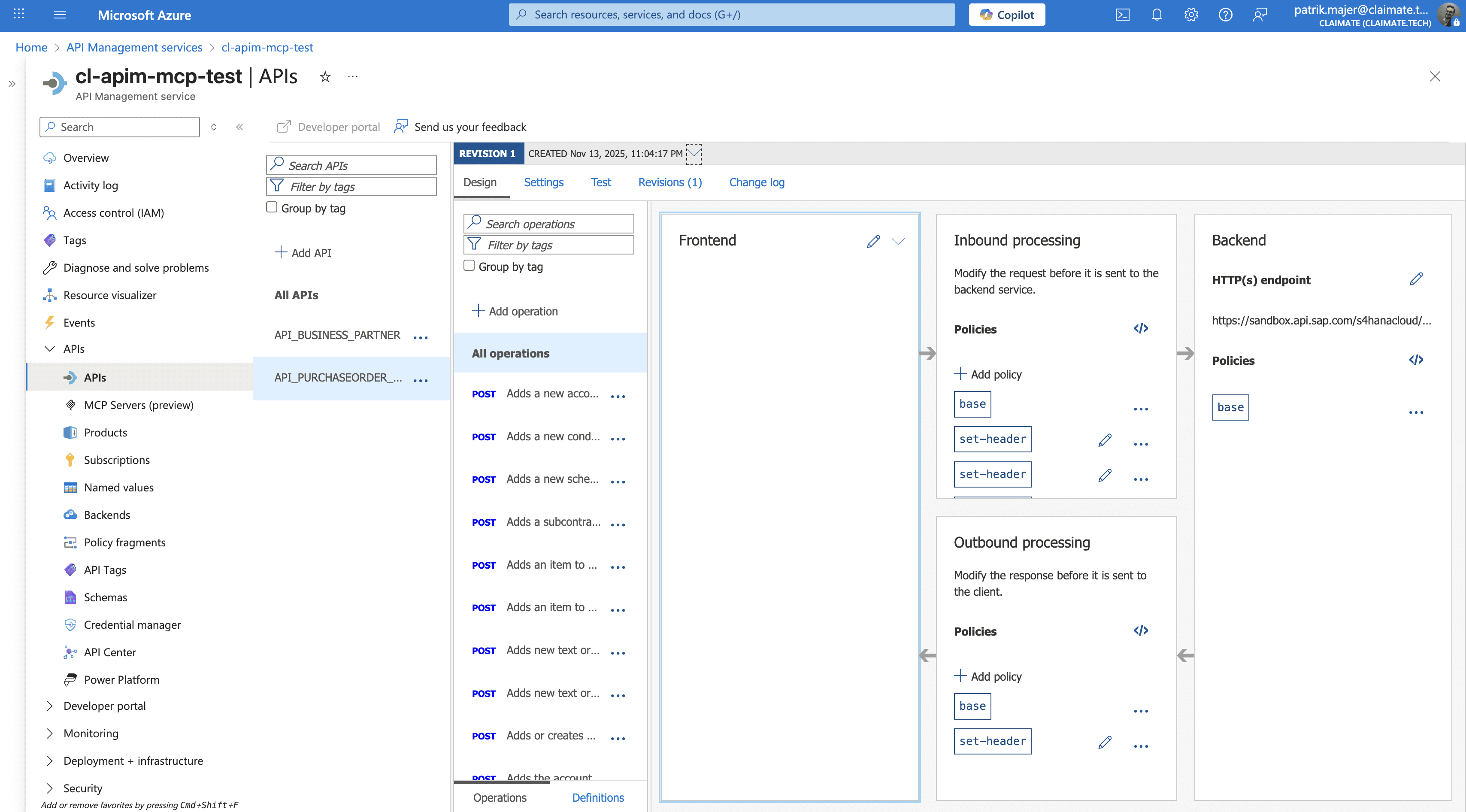
Step 1: Import the SAP API into Azure API Management
SAP exposes an OData endpoint for Purchase Orders:
https://sandbox.api.sap.com/s4hanacloud/sap/opu/odata/sap/API_PURCHASEORDER_PROCESS_SRV
We imported a trimmed OpenAPI spec containing only:
A_PurchaseOrder
A_PurchaseOrderItem
This keeps APIM clean and avoids exposing hundreds of unused SAP entities.
Step 2: Inject API Key Authentication in APIM
Instead of making Copilot (or MCP) deal with authentication, APIM handles it.
Inbound policy:
<set-header name="apikey" exists-action="override">
    <value>YOUR_SAP_SANDBOX_KEY</value>
</set-header>
We also disabled response compression to avoid gzipped payloads that Copilot couldn’t read:
<set-header name="Accept-Encoding" exists-action="delete" />
<set-header name="Accept-Encoding" exists-action="override">
    <value>identity</value>
</set-header>
This ensured SAP always returned plain JSON/XML, not raw gzip bytes.
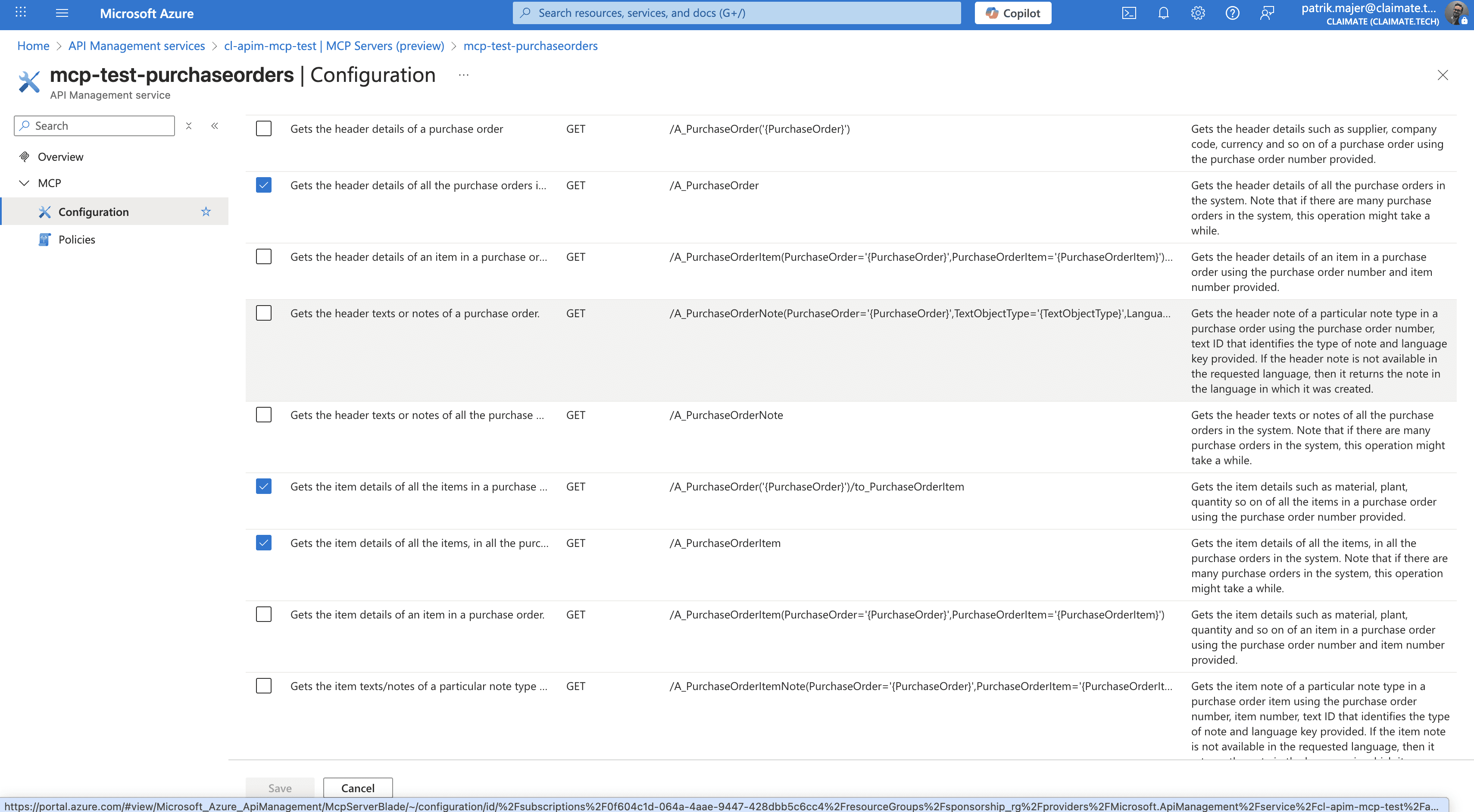
Step 3: Connect APIM to an MCP Server
The MCP server is simply a small piece of code that:
Exposes an MCP tool definition (JSON/OpenAPI)
Calls the APIM endpoint
Returns the SAP data back to Copilot
Since APIM already injects the SAP API key, the MCP code stays clean and credential-free.
Step 4: Add MCP Server to Copilot Studio
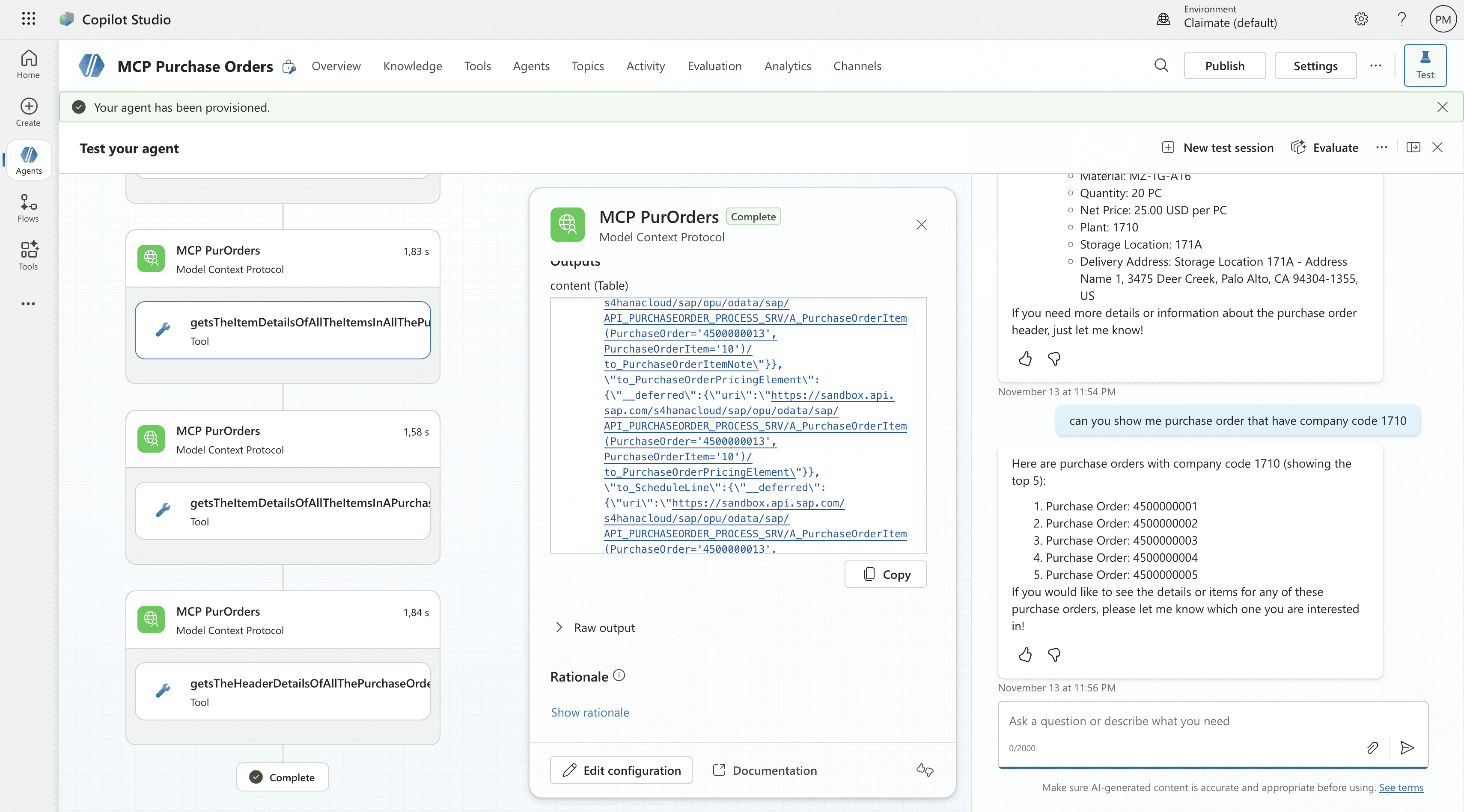
In Copilot Studio:
Add a custom plugin (MCP)
Point it to your MCP server endpoint
Test tool invocation with natural language
Example prompt:
“Show me the latest purchase orders from SAP.”
The agent calls the MCP server → APIM → SAP → APIM → MCP → Copilot.
All you see is working SAP data in a chat window.
A Working Enterprise Agent, End-to-End
Once the headers, paths, and response formats were corrected, the integration worked instantly.
Copilot was able to query real SAP Purchase Order data through a secure and controlled APIM gateway.
This setup demonstrates how:
APIM can shield agents from complex authentication
MCP can bridge any REST endpoint into a conversational workflow
Copilot Studio can reason over enterprise data with minimal wiring
Final Thoughts
In under an hour, we connected SAP data to Copilot Studio using Azure API Management and MCP — no friction, no heavy custom code, and no direct credential handling.
This is the kind of acceleration enterprises are looking for:
Fast prototypes
Secure integration layer
Reusable APIs
AI-ready data
Disclaimer
This demo hides a lot of complexity that real enterprise integrations must handle properly:
Full OAuth2 / OBO flow for SAP BTP / SAP S/4HANA
Role-based authorization
VNet integration / private networking
Throttling, caching, and policy governance
Schema management for large OData services
Compliance and data residency requirements
But for experimentation, prototyping, and internal enablement, this approach shows what’s possible with surprisingly little effort.
Technical blog
Look How Fast You Can Run a Working Copilot Agent Using SAP Data
Created by DALL-E
Patrik Majer
Dec 2, 2025
AI
If you've ever tried to connect enterprise backends to conversational agents, you know it usually takes weeks—security setup, API discovery, authentication, integration layers, and a lot of trial and error.
But with Azure API Management (APIM), Microsoft Copilot Studio, and a small MCP (Model Context Protocol) bridge, you can get a running end-to-end agent in just a few hours.
This post walks through how we connected SAP’s public sample Purchase Order API to Copilot Studio using APIM, added API-key authentication, and made the data instantly available to an enterprise agent.
Important note:
This demo uses SAP’s public sandbox environment and simple API-key authentication, not a full enterprise OAuth/On-Behalf-Of (OBO) flow. Real-world SAP integrations require proper identity, scopes, and networking controls — think of this as a rapid prototype, not a production pattern.
The Architecture in 30 Seconds
Here’s the lightweight setup:
Copilot Studio → MCP Server → Azure API Management → SAP Sandbox API
Copilot Studio: The front-end agent that understands your requests
MCP Server: A lightweight “tool” interface that Copilot uses to call APIs
APIM: The place where we shape, secure, and transform the SAP API
SAP Sandbox API: The data source (Purchase Orders)
Copilot never sees secrets — APIM injects the API key securely.
Step 1: Import the SAP API into Azure API Management
SAP exposes an OData endpoint for Purchase Orders:
https://sandbox.api.sap.com/s4hanacloud/sap/opu/odata/sap/API_PURCHASEORDER_PROCESS_SRV
We imported a trimmed OpenAPI spec containing only:
A_PurchaseOrder
A_PurchaseOrderItem
This keeps APIM clean and avoids exposing hundreds of unused SAP entities.
Step 2: Inject API Key Authentication in APIM
Instead of making Copilot (or MCP) deal with authentication, APIM handles it.
Inbound policy:
<set-header name="apikey" exists-action="override">
    <value>YOUR_SAP_SANDBOX_KEY</value>
</set-header>
We also disabled response compression to avoid gzipped payloads that Copilot couldn’t read:
<set-header name="Accept-Encoding" exists-action="delete" />
<set-header name="Accept-Encoding" exists-action="override">
    <value>identity</value>
</set-header>
This ensured SAP always returned plain JSON/XML, not raw gzip bytes.
Step 3: Connect APIM to an MCP Server
The MCP server is simply a small piece of code that:
Exposes an MCP tool definition (JSON/OpenAPI)
Calls the APIM endpoint
Returns the SAP data back to Copilot
Since APIM already injects the SAP API key, the MCP code stays clean and credential-free.
Step 4: Add MCP Server to Copilot Studio
In Copilot Studio:
Add a custom plugin (MCP)
Point it to your MCP server endpoint
Test tool invocation with natural language
Example prompt:
“Show me the latest purchase orders from SAP.”
The agent calls the MCP server → APIM → SAP → APIM → MCP → Copilot.
All you see is working SAP data in a chat window.
A Working Enterprise Agent, End-to-End
Once the headers, paths, and response formats were corrected, the integration worked instantly.
Copilot was able to query real SAP Purchase Order data through a secure and controlled APIM gateway.
This setup demonstrates how:
APIM can shield agents from complex authentication
MCP can bridge any REST endpoint into a conversational workflow
Copilot Studio can reason over enterprise data with minimal wiring
Final Thoughts
In under an hour, we connected SAP data to Copilot Studio using Azure API Management and MCP — no friction, no heavy custom code, and no direct credential handling.
This is the kind of acceleration enterprises are looking for:
Fast prototypes
Secure integration layer
Reusable APIs
AI-ready data
Disclaimer
This demo hides a lot of complexity that real enterprise integrations must handle properly:
Full OAuth2 / OBO flow for SAP BTP / SAP S/4HANA
Role-based authorization
VNet integration / private networking
Throttling, caching, and policy governance
Schema management for large OData services
Compliance and data residency requirements
But for experimentation, prototyping, and internal enablement, this approach shows what’s possible with surprisingly little effort.